Taking Terraform to Production: Automating IaC with CI/CD
Learn how to automate Terraform with CI/CD pipelines. Discover OIDC authentication, automated PR plans, state locking, and drift detection for production IaC.

 Somraj SahaChief Technology Officer (CTO) @jarmos-san
Infrastructure as Code (IaC) has revolutionized how modern engineering teams build, manage, and scale cloud environments. With tools like Terraform, provisioning complex architecture requiring a wide variety of cloud resources is as simple as defining declarative HCL (HashiCorp Configuration Language) files.
However, a tool is only as reliable as the workflow surrounding it.
In early-stage projects, running terraform apply directly from a developer's
local terminal is common. But as your team grows and your workloads move into
production, local execution becomes a massive liability at scale. To achieve
true stability, auditability, and speed, you must shift Terraform from local
execution into an automated, secure CI/CD pipeline.
In this guide, we’ll explore how we (at Weburz) take Terraform to production by building a robust CI/CD pipeline, securing our workflows, and prevent infrastructure drift.
The Risk of Local Execution
For testing or development purposes, running Terraform on a developer's environment is acceptable and is actually the recommended approach. Following the same approach in production is unacceptable and lead to disastrous consequences.
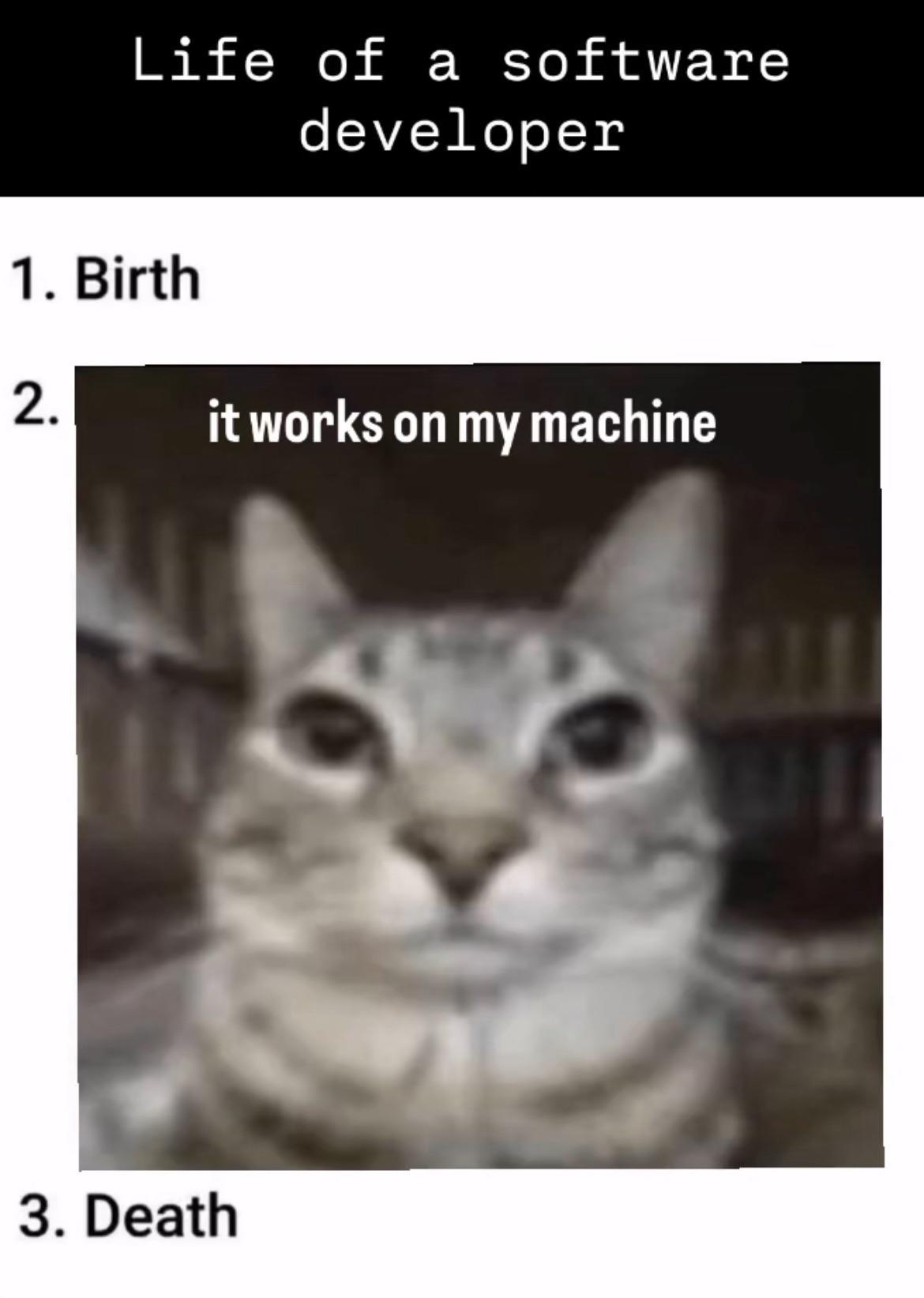
For starters, a developer's environment is often messy and unpredictable with varying CLI versions, uncommitted code branches and what not. Hence, relying completely on a local development environments to provision the infrastructure using Terraform could lead to the " ...but this works on my machine... " problem.
Using local development environments for infrastructure provisioning also leads
to a lack of visibility and auditability when someone executes terraform apply
locally. There's no mandatory peer review, no centralised log history and no
clear audit trail linking the code changes to the cloud events. You could say,
"there's a log history provided by the cloud service provider" but I would say
"prevention is better than cure". It's always better to be cautious and follow
established Standard Operating Procedures (SOP) rather than frantically figuring
out resolutions when disaster strikes.
There's also a risk of concurrency which is often overlooked (especially at
smaller scale organisations). These issues arise in rare cases where two
engineers run terraform apply simultaneously on local machines without strict
remote locking. In situations like these, Terraform could potentially risk
corrupting the state file and thereby messing up the provisioned infrastructure
as well.
By far the riskiest situation is having access to the unencrypted state file on disk in the developer's local environment. When provisioning the production environment, Terraform creates a state file which is stored on disk (by default) but can be configured to be stored in a secured location (such as Azure Blob Storage containers). Leaving such high-privilege credentials stored on their workstations increase the attack surface if the device is ever lost or compromised.
We eliminate these risk by automating the Terraform IaC inside a CI/CD platform by establishing a single source of truth and a standardized, repeatable execution pipeline. The next few sections of the blog post will shed more insight in how we do it.
Prerequisites: Remote State and Locking
Before building a pipeline, it's necessary to ensure the state file is stored
securely outside of local repositories since it contains a mapping of the
declarative code to real-world infrastructure resources, along with sensitive
output values. Terraform generates these state files with a .tfstate file
extension and they should NEVER be edited manually nor committed to a
version control system.
To store the state files safely, we recommend following this checklist below:
- The state file with sensitive values are protected by encrypting it at rest and in transit.
- Prevent simultaneous pipeline runs from mutating the state concurrently.
At Weburz, we secure our Terraform state by storing the file in an Azure Blob Storage container (with strict RBAC rules applied to it). Terraform can fetch/store the state file to the remote container as long as it's configured to do so using an appropriate "backend".
Here is an example backend configuration using Microsoft Azure and Azure Blob Storage we use at Weburz:
terraform {
  required_version = ">= 1.17.0"

  required_providers {
    azurerm = {
      source  = "hashicorp/azurerm"
      version = "~>5.12"
    }
  }

  backend "azurerm" {
      resource_group_name  = "WeburzRG"
      storage_account_name = "terraform-state"
      container_name       = "tfstate-production"
      key                  = "terraform.production.tfstate"
  }
}

provider "azurerm" {
  features {}
}
After authenticating yourself to Azure
(ideally using Azure CLI),
creating the container resources and setting up the container access key, you
should run terraform init in your local environment. Terraform will now
install all the necessary dependencies and then write the state to the remote
location for further usage.
With the state file secured and usable, the developers can run terraform apply
any number of times and anywhere while safely managing the production
infrastructure. Now we can design the SOP for the pipeline from publishing the
IaC from the commit to peer review and approval then followed by the actual
infrastructure provisioning in the next section.
Designing the Two-Phase Pipeline Architecture
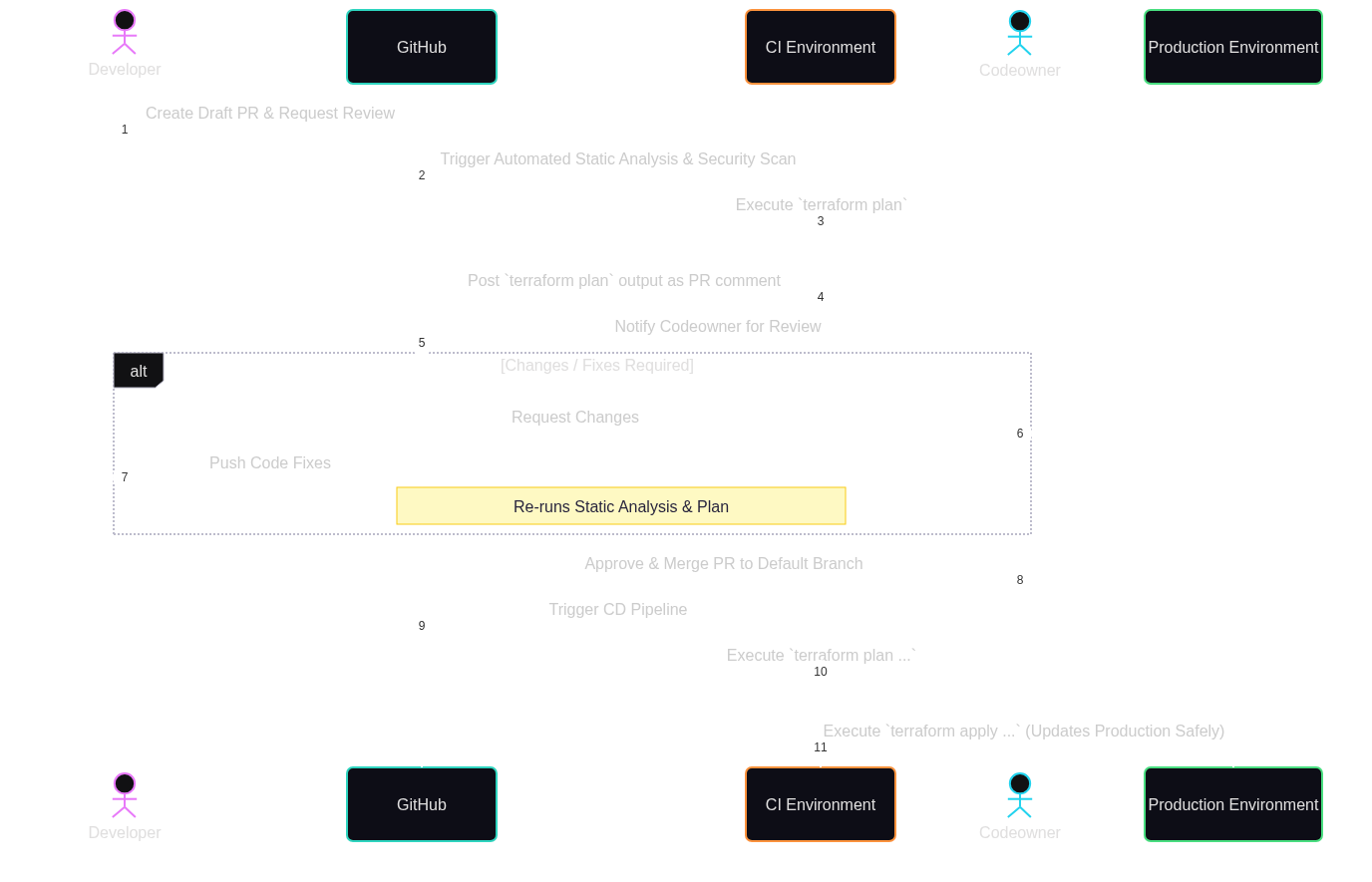
At Weburz our SOP for managing the infrastructure using Terraform is as follows:
- Developer creates a draft PR on GitHub and requesting the codeowner for review.
- The PR goes through an automated static analysis and security scan before being reviewed by a codeowner.
- The CI environment executes a
terraform plancommand and writes the output to a PR comment for the codeowner's review. - The codeowner requests for changes and/or fixes (if necessary) then merges
the PR to the default branch. This triggers another CI/CD workflow to execute
the
terraform plan ...andterraform apply ...commands to update the production environment safely.
For quick reference, here's a visual representation of our Terraform workflow. It has worked out perfectly well for us and we hope it might help you in one way or the other as well;
When a developer submits a pull request (PR) against the default branch on GitHub, it triggers a CI workflow with these objectives:
- Lint & Format Check: Enforce code styling using
terraform fmt -checkandterraform validate. - Security Scanning: Run static analysis tools like
checkovto flag misconfigurations (for example, publicly accessible storage buckets or wildcard IAM permissions). - Generate Plan: Execute
terraform planagainst the target cloud provider and then automatically attach the plan output as a comment on the PR. This gives peer reviewers total visibility into added, modified, or destroyed resources before any code merges.
Once the PR is approved and merged into the main branch, an automated deployment
pipeline is triggered. This workflow checks out the updated default branch, runs
terraform plan "main.tfplan" to regenerate the plan and then provisions the
infrastructure by running terraform apply "main.tfplan" (if any changes
exist).
Securing Pipelines with OIDC (OpenID Connect)
Historically, automated pipelines relied on long-lived API keys stored as secret
environment variables (for example, AWS_ACCESS_KEY_ID and
AWS_SECRET_ACCESS_KEY). These keys require periodic rotation and create severe
vulnerability risks if leaked.
At Weburz, we use modern CI/CD platforms (like GitHub Actions) which supports OpenID Connect (OIDC), enabling secure and keyless authentication in our CI/CD environments.
While providing a detailed explanation of the inner workings of OIDC is out-of-scope of this article, here's a brief description of we use it to authenticate to our cloud service providers.
- The CI runner requests a short-lived JSON Web Token (JWT) from the CI provider.
- The runner presents this token to our cloud provider’s Identity Provider (for example, Microsoft Entra ID).
- The cloud provider verifies the identity token and exchanges it for short-lived, temporary access credentials strictly scoped to the duration of the pipeline job.
For reference, here's a sample GitHub Actions workflow which uses OIDC to authenticate to Microsoft Entra ID before executing the Terraform commands and provisioning the infrastructure on Microsoft Azure.
name: "Terraform Infrastructure Pipeline"

on:
  push:
    branches: ["main"]

permissions:
  id-token: write
  contents: read
  pull-requests: write

jobs:
  terraform:
    runs-on: ubuntu-latest
    steps:
      - name: Checkout Code
        uses: actions/checkout@v4

      - name: Configure Azure Credentials via OIDC
        uses: https://github.com/azure/login@v3
        with:
          client-id: ${{ secrets.AZURE_CLIENT_ID }}
          tenant-id: ${{ secrets.AZURE_TENANT_ID }}
          subscription-id: ${{ secrets.AZURE_SUBSCRIPTION_ID }}

      - name: Setup Terraform
        uses: hashicorp/setup-terraform@v3

      - name: Terraform Init
        run: terraform init

      - name: Terraform Plan
        run: terraform plan "main.tfplan" -no-color

      - name: Terraform Apply
        run: terraform apply "main.tfplan"
NOTE: For Azure to trust GitHub's OIDC token, you will need to perform some manual one-time configurations though. You will find the details instructions here - Configuring OpenID Connect in Azure .
Continuous Drift Detection
Even with automated pipelines, out-of-band changes can happen; for example, a team member might modify a security group rule via the cloud console during an operational emergency. This creates infrastructure drift, where real-world resources deviate from the defined codebase. Hence it's important to handle it as early in the pipeline as possible.
Although we've not set up early detection and warning systems for infrastructure drift yet, we've it in our roadmap and here's how we plan on tackling it:
- Set up a scheduled nightly pipeline (for example, GitHub Action's
scheduleevent) which runsterraform plan -detailed-exitcode. - The
-detailed-exitcodeflag returns:0when the pipeline succeeded with no changes.1when an error occurred in the pipeline.2when the pipeline succeeded, but drift detected (pending changes exist).
- If the job returns code
2, we may send an alert via mail or create an issue thread in our incident tracking system.
We hope, this will ensure our infrastructure stays aligned with our code repository without relying on manual audits from time to time.
We wrote about infrastructure drift in more details here - Managing Infrastructure Drift: How Packer, Terraform, and Ansible Keep Enterprise Environments Compliant, so give it a read if you want to learn more.
Conclusion & Next Steps
Automating Terraform through a CI/CD pipeline transforms infrastructure management from a high-risk manual task into a secure, predictable, and fully auditable process.
To recap the roadmap for production-ready IaC automation:
- Centralize state storage with remote backends and state locking.
- Enforce PR-driven reviews where
terraform planis transparently displayed before code merges. - Adopt keyless authentication using OIDC to eliminate long-lived cloud credentials.
- Implement automated drift detection to ensure code remains the definitive source of truth.
By treating our infrastructure with the same rigor as software development, our teams deliver cloud resources faster while maintaining absolute confidence in production stability.